Return To Top
Solution

Prove Auth

A unified authentication solution that allows for omnichannel auth, passwordless login and/or a seamless second factor. Authenticate users with minimal friction. Prove uses strong binding to initially register a Prove Key on the device, after which that key can be used either in-app or from secondary channels (ie. Desktop, Call Center, or Retail).

Bill Fish

Slack : bill.fish

A1Login & OTP Replacement

Mobile App - Passive

Status: Beta
Solution & Use Case FAQ

As the user logs in, Prove verifies the device is the same as was registered at first app login. The first time a phone is seen use PRO to complete registration

The user is logged in without the need for entering a password

Download The Full CX Flow


A1Login & OTP Replacement

Desktop - Passive

Status: Beta
Push Auth Fact SheetSolution & Use Case FAQ

User is logging in to their account on a secondary device (eg. desktop, tablet, etc.) with a username only.

If enabled, offer a Push Auth option to the user.

The customer approves the login attempt and accepts the push notification and Prove verifies the device was previously registered.

The user is logged in to the website

Download The Full CX Flow

Pre-Fill enables consumers to frictionlessly complete applications

A1Login & OTP Replacement

Mobile App Step-up - Passive

Status: Beta
Push Auth Fact SheetSolution & Use Case FAQ

As the customer attempts to login, Prove verifies possession of the device.

Use the on-device biometric to add a second factor of authentication.

Use the on-device biometric to add a second factor of authentication.

The user has been authenticated with two factors.

Download The Full CX Flow

A1Login & OTP Replacement

Desktop Step-up - Passive

Status: Beta
Push Auth Fact SheetSolution & Use Case FAQ

User is logging in to their account on a desktop or other secondary device with existing credentials.

If enabled, offer a Push Auth option to the user.

The customer approves the login through the push notification, while Prove verifies possession of the registered device

Use the on-device biometric to authenticate with a second factor.

Use the on-device biometric to authenticate with a second factor.

The transaction is allowed to proceed
if the proper person is authenticated

Download The Full CX Flow

A1Login & OTP Replacement

Mobile App Authorization - Passive

Status: Beta
Solution & Use Case FAQ

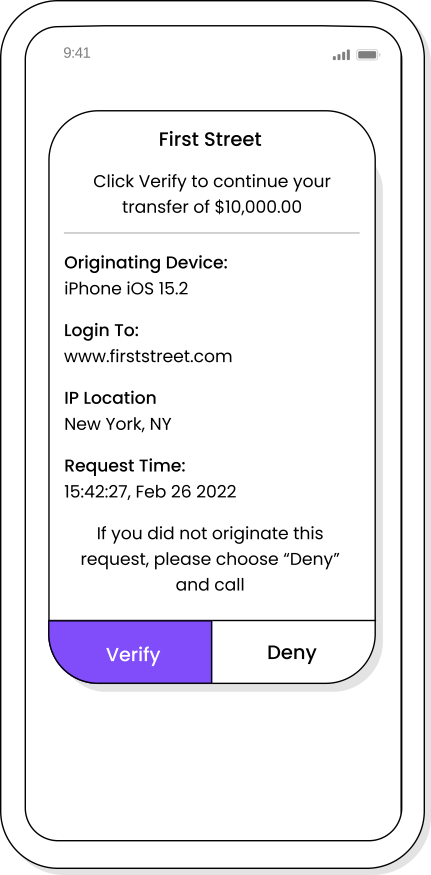
The customer wants to make a high risk transaction like transferring funds to a friend.

After the customer confirms that they want to send money to their friend, Prove verifies the device via the SDK.

Use the on-device biometrics to authenticate.

Use the on-device biometrics to authenticate.

The transaction is allowed to proceed if the proper person is authenticated

Download The Full CX Flow

Pre-Fill enables consumers to frictionlessly complete applications

Pre-Fill enables consumers to frictionlessly complete applications

A1Login & OTP Replacement

Desktop Authorization - Passive

Status: Beta
Push Auth Fact SheetSolution & Use Case FAQ

User is attempting a high-risk transaction on a desktop or other secondary device.

If enabled, offer a Push option to the user.

Prove authenticates the user through their mobile device.

The customer confirms that they approve the transaction. Prove verifies the device if previously registered or if required  verifies the phone number with the mobile network operator (MNO) with Trust Score and authenticates the customer's identity in the background using behavioral biometrics

Use the FIDO-registered biometric from the device to authenticate.

Use the FIDO-registered biometric from the device to authenticate.

The transaction is allowed to proceed if the proper person is authenticated

Download The Full CX Flow

A2Extreme High Risk - MotionAuth

Mobile App - Behavior

Status: Alpha
Gait Auth Fact SheetSolution & Use Case FAQ

User wants to perform a Extreme Risk Transaction (ERT)

Prove verifies the device as in A1 and authenticates the customer in the background using motion-based biometrics

Optional: Use the on-device biometric to authenticate further.

Optional: Use the on-device biometric to authenticate further.

The transaction is allowed to proceed if the proper person is authenticated

Download The Full CX Flow

Pre-Fill enables consumers to frictionlessly complete applications

Pre-Fill enables consumers to frictionlessly complete applications

A2Extreme High Risk - MotionAuth

Desktop - Behavior

Status: Alpha
Gait Auth Fact SheetSolution & Use Case FAQ

The customer wants to perform an Extreme Risk Transaction (ERT), such as transferring a large sum of money to a third party.

The customer is offered a selection of additional authentication options and  selects Push Authentication.

Prove verifies the user’s identity leveraging mobile device information

The customer confirms that they approve the transaction. Prove verifies the device and authenticates the customer's identity in the background using motion-based behavioral biometrics

Optional: Use the on-device biometric to authenticate further.

Optional: Use the on-device biometric to authenticate further.

The transaction is allowed to proceed if the proper person is authenticated

Download The Full CX Flow

A3Standard Authenticators

Mobile Auth

Status: Release
Solution & Use Case FAQ

As the customer attempts to login, Prove discovers the phone number from the Mobile Network Operator, to be used to authenticate the correct user.

The user has been authenticated

Download The Full CX Flow


A3Standard Authenticators

Instant Link - Desktop

Status: Release
Solution & Use Case FAQ

User is logging in to their account on a desktop or other secondary device.

If enabled, offer a Push Auth option to the user. If Push Auth is unavailable, fallback to Instant Link.

User clicks the URL in the text message, and Prove authenticates possession in the background.

The transaction is allowed to proceed if the proper person is authenticated

Download The Full CX Flow

MarketplacePhysical Access

Mobile (MotionAuth)

Status: Alpha
Gait Auth Fact SheetSolution & Use Case FAQ

As the user approaches the door, a sensor detects the presence of the mobile device (via bluetooth or NFC). The motion data of the user is then evaluated against the model.

If the user’s motion matches the model then access is granted.

Download The Full CX Flow

Pre-Fill enables consumers to frictionlessly complete applications

Pre-Fill enables consumers to frictionlessly complete applications

Prove Auth Rate Card

Prove Auth Case Studies

Stay tuned! Case studies coming soon...